Specification of the meta file formats
Unlike many other tools, TagSpaces uses external text files instead of a database for saving metadata about folders and files. This page documents the JSON formats used by these files. It is intended for developers, extension authors, and advanced users who need to understand or manipulate TagSpaces metadata programmatically.
Role of the meta folder
The folder containing the meta information for given folder is called .ts. The dot in front of the name makes this folder automatically hidden on Unix-based file systems like Linux and macOS. On Windows, a flag is set explicitly to make this folder hidden. Every folder managed in TagSpaces will have its own meta folder.
The meta folder contains the following files:
- tsm.json - contains the meta information for the parent folder of the
.tsfolder - tsi.json - contains the search index for the parent folder if it is the root of a location
- tst.jpg - is the thumbnail file of the parent folder
- tsb.jpg - is the background image file of the parent folder
- tsl.json - contains location-specific tag groups, if the parent folder is the root of a location
- file1.ext.jpg - every file in the parent folder can have a thumbnail which is saved in this file (if the main file is called
document.pdfthe thumbnail file will be nameddocument.pdf.jpg) - file1.ext.json - every file in the parent folder can have its own meta information which is saved in this file (for a file called
file.ext)
File meta description format
This file should be located in a folder called .ts located in the folder, where the tagged file is placed. The meta file should have exactly the same name as the tagged file, but in addition it should have the .json file extension. So at the end you should have similar structure as the following:
~ /some/TagSpaces/location/folder
├── subfolder_1
│   ├── .ts
│   │   ├── file1.jpg.json
│   │   └── file2.pdf.json
│   ├── file1.jpg
│   └── file2.pdf
├── .ts
│   ├── file3.png.json
│   └── file4.docx.json
├── file3.png
└── file4.docx
The meta information is saved in JSON format, which has the following format:
{
  "id": "4194969c6bb84ad3acac779645c90e70",
  "tags": [
    // A set containing the file tags
    {
      "title": "tag1", // The name of the tag
      "type": "sidecar", // The type of the tag
      "color": "#ffcc24", // The background color of the tag
      "textcolor": "#ffffff" // The text color of the tag
    },
    {
      "title": "tag2",
      "type": "sidecar",
      "color": "#ffcc24",
      "textcolor": "#ffffff"
    }
  ],
  "description": "# Some description\n\nin *markdown* format" // \n is used for adding new line
}
Folder meta description format
In the PRO version of the application you can add tags and description to every folder managed in TagSpaces. This meta information is persisted in a file called tsm.json located in .ts folder of the tagged folder. The following is an example folder structure of a tagged folder with one tagged subfolder.
~ /some/TagSpaces/location/folder
├── subfolder_2
│   ├── .ts
│   │   ├── tsm.json // a file containing the meta info for subfolder_2
│   │   └── file2.pdf.json
│   └── file2.pdf
├── .ts
│   ├── tsm.json
│   └── file4.docx.json
└── file4.docx
The meta information is saved in JSON format, which has the following format:
{
  "id": "6622238f41024c1a934948abe2e56540", // id of folder
  "color": "#a47ae244", // the background color of the folder
  "description": "# Some description\n\nin *markdown* format", // \n can be used for adding new line
  "tags": [
    // the tags added to the folder
    {
      "title": "1926", // tag name
      "type": "sidecar", // tag type
      "color": "#cca6acff", // tag background color
      "textcolor": "white" // the color of the text in the tag
    },
    {
      "title": "3star",
      "type": "sidecar",
      "color": "#ffcc24",
      "textcolor": "#ffffff"
    }
  ],
  "perspectiveSettings": {
    "list": {
      // the List perspective settings of the current folder
      "testID": "listPerspectiveContainer",
      "settingsKey": "tsPerspectiveList",
      "orderBy": true,
      "sortBy": "byName",
      "layoutType": "row",
      "singleClickAction": "openInternal",
      "entrySize": "tiny",
      "thumbnailMode": "contain",
      "showDirectories": true,
      "showDetails": true,
      "showDescription": false,
      "showEntriesDescription": true,
      "showTags": true,
      "gridPageLimit": 100,
      "maxDescriptionPreviewLength": 100
    },
    "grid": {
      // the Grid perspective settings of the current folder
      "testID": "gridPerspectiveContainer",
      "settingsKey": "tsPerspectiveGrid",
      "orderBy": true,
      "sortBy": "byName",
      "layoutType": "grid",
      "singleClickAction": "openInternal",
      "entrySize": "small",
      "thumbnailMode": "cover",
      "showDirectories": true,
      "showDetails": true,
      "showDescription": false,
      "showEntriesDescription": true,
      "showTags": true,
      "gridPageLimit": 100,
      "maxDescriptionPreviewLength": 100,
      "nativeDragModeEnabled": false
    },
    "kanban": {
      // the Kanban perspective settings of the current folder
      "settingsKey": "tsKanBanPerspective",
      "orderBy": true,
      "sortBy": "byName",
      "layoutType": "grid",
      "singleClickAction": "openInternal",
      "entrySize": "small",
      "thumbnailMode": "contain",
      "showDirectories": true,
      "showDetails": true,
      "showSubFolderDetails": false,
      "showEntriesDescription": false,
      "showFolderContent": false,
      "showTags": true,
      "filesLimit": 15,
      "initColumnsLimit": 5
    }
  },
  "customOrder": {
    // order of the files (cards) and folders (columns) used in Kanban perspective
    "folders": [
      { "uuid": "6622238f41024c1a934948abe2e56540", "name": "Folder1" },
      { "uuid": "02a2a158c17b4b7bb45a583bd5029e28", "name": "Folder2" },
      { "uuid": "f367e3cf8958471aa8d8ae9076ceb6cb", "name": "Folder3" }
    ],
    "files": [
      {
        "uuid": "02c5a465b3164110bd6ad3a1721ed27a",
        "name": "file1.png"
      },
      {
        "uuid": "f3b6b54e394849d59a9a77ebeaed8a5a",
        "name": "file2.md"
      },
      {
        "uuid": "eead6bac508f4634abde93921fc11a37",
        "name": "file3.pdf"
      }
    ]
  }
}
In the JSON examples on this page, comments after // characters are used for clarification only. They are not part of the actual JSON format, which does not support comments.
Format of the tag library export
All tag groups and tags can be exported from the settings of the application, as shown in the next screenshot.
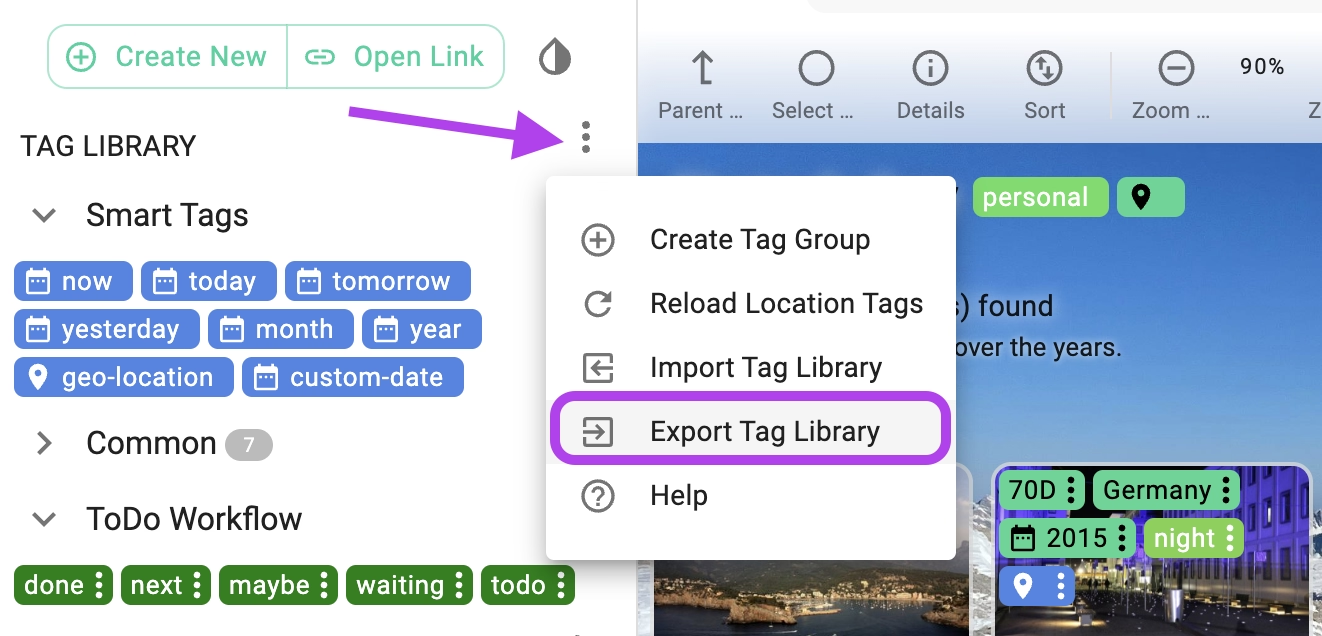
The meta information is persisted in JSON format, which has the following format:
{
  "appName": "TagSpaces", // the app name from which this file was generated
  "appVersion": "6.4.5", // the version of the app from which this files was generated
  "settingsVersion": 3,
  "tagGroups": [
    // a list of one or more tag groups
    {
      "created_date": "1728677734620", // the time when this tag group was created
      "uuid": "5d8e8305a3ba4fa394fdbb13823dce6d", // a universally unique identifier of the tag group
      "title": "TestTG", // the name of the tag group
      "color": "#fa573cff", // the default color of the tags in this tag group
      "textcolor": "white", // the default text color of the tags in this tag group
      "children": [
        // a list of one or more tags in the current tag group
        {
          "title": "tag1", // the name of the tag
          "description": "some description", // optional description of the tag
          "color": "#fa573cff", // the color of the tag
          "textcolor": "white" // the text color of the tag
        },
        {
          "title": "tag2",
          "color": "#fa573cff",
          "textcolor": "white"
        }
      ],
      "modified_date": "1744893534077",
      "expanded": false
    },
    {
      "uuid": "e28bd828c1e445ed810ac660609f9780",
      "title": "Another tag group", // the name of the second tag group in the list
      "color": "#cca6acff",
      "textcolor": "white",
      "children": [
        {
          "type": "sidecar",
          "color": "#cca6acff",
          "textcolor": "white"
        }
      ],
      "created_date": "1744893534077",
      "modified_date": "1744893534077",
      "expanded": true
    }
  ]
}
Format of the location export
PROThe locations can be exported from one TagSpaces Pro installation and imported in another. The format of the exported file is presented in this section. The example below specifies one local location and two locations pointing to object storages. The second one is AWS S3 object storage, while the third one is pointing to MinIO server.
{
  "appName": "TagSpaces", // the app name from which this file was generated
  "appVersion": "6.4.5", // the version of the app from which this files was generated
  "locations": [
    // a list containing one or many locations
    {
      "uuid": "1fa528e7-92b4-3ew2-b4b9-3cd975d87fba",
      "type": "0", // 0 specifies a location pointing to a local folder
      "name": "Desktop", // name of the location
      "path": "/home/username/Desktop", // path pointing to a local folder, should not be empty on local locations
      "isDefault": true, // specifies if this location is the default one, which loads after starting the app
      "isReadOnly": false, // specified is the location should be in read-only mode
      "disableIndexing": false, // if "true" the app will try to find an existing search index and use it for the searches, by "false" the app will create the index on every search (unless the last created index in the current browser session is not expired see maxIndexAge property)
      "disableThumbnailGeneration": false, // disables the process of thumbnail generation, useful for S3 buckets where you do not want to download the folder content in order to generate thumbnails
      "creationDate": 1743859126680, // the creation time of the location
      "lastEditedDate": 1744891863809,
      "fullTextIndex": false, // activated the full-text search for TXT, MD and HTML files
      "maxIndexAge": 660000, // time in milliseconds (10 minutes x 60 secs per minute x 1000 milliseconds per second) for which the index is valid
      "watchForChanges": true, // activates the watching for changed files in the current location
      "ignorePatternPaths": ["**/node_modules/**"], // list of path strings to ignore while indexing
      "persistTagsInSidecarFile": false // specifies the way files are tagged in this location
    },
    {
      "uuid": "681c60cc-67uz-4221-aebf-f35ce797cd0c",
      "type": "1", // 1 specifies a location from object storage type (cloud location)
      "name": "TS Pro Releases AWS",
      "endpointURL": "",
      "accessKeyId": "aws_access_key_id", // access key id
      "secretAccessKey": "some_secret_key", // secret key id
      "encryptionKey": "some_enc_key", // key for the decryption of encrypted files
      "bucketName": "your_bucket_name", // the name of the bucket in the object storage
      "region": "eu-central-1", // AWS region
      "isDefault": false,
      "isReadOnly": true,
      "disableIndexing": false,
      "disableThumbnailGeneration": true,
      "fullTextIndex": false,
      "watchForChanges": false,
      "creationDate": 1740474629766,
      "lastEditedDate": 1744891863809,
      "maxLoops": 2,
      "path": "an_optional_path_in_the_s3_bucket"
    },
    {
      "uuid": "2762d4e6-559b-4421-3w12-e40c967160d8",
      "type": "1",
      "name": "MinIO Server on QNAP NAS",
      "path": "/",
      "endpointURL": "http://192.168.178.12:7000", // a URL to the server (e.g. MinIO) providing the object storage
      "accessKeyId": "miniouser",
      "secretAccessKey": "secret_minio_password",
      "bucketName": "Photos",
      "region": "",
      "isDefault": false,
      "isReadOnly": false,
      "disableIndexing": false,
      "fullTextIndex": false,
      "watchForChanges": false,
      "creationDate": 1740474629766
    }
  ]
}
Format of the exported search queries
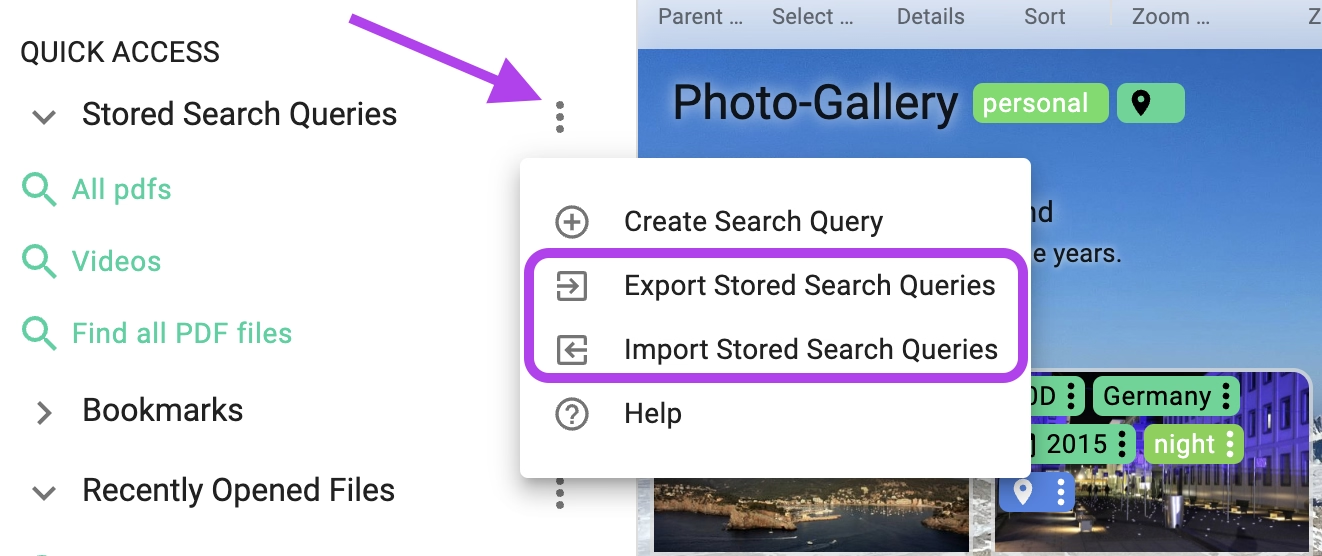
PROTagSpaces Pro offers the possibility to export previously saved search queries. And later import them in another TagSpaces Pro installation.
{
  "appName": "TagSpaces",
  "appVersion": "6.4.5",
  "searches": [
    {
      "uuid": "3c5c1937043a43388f44408944ac31ba",
      "title": "testquery +1920 -article |5star",
      "textQuery": "testquery",
      "tagsAND": [
        {
          "title": "1920"
        }
      ],
      "tagsOR": [
        {
          "title": "5star"
        }
      ],
      "tagsNOT": [
        {
          "title": "article"
        }
      ],
      "searchBoxing": "location", // "location", "folder" or "global"
      "searchType": "fuzzy", // "fuzzy", "strict" or "semistrict"
      "fileTypes": ["md", "mdown", "txt", "html"], // file extension you need can be added here
      "lastModified": "past7Days",
      "fileSize": "sizeVerySmall",
      "tagTimePeriodFrom": 1622505600000,
      "tagTimePeriodTo": 1625090399999,
      "maxSearchResults": 1000,
      "forceIndexing": false // true or false
    }
  ]
}
Format of the location specific tag groups
PROSince version 3.11 TagSpaces supports tags which are specific for a given location. The tags resides in a file called tsl.json, which should be located in the .ts folder of the current location.
~ /some/TagSpaces/location/folder
├── subfolder_2
├── .ts
│   ├── tsm.json
│   ├── tsl.json // file containing the tag groups of this location
│   └── file4.docx.json
└── file4.docx
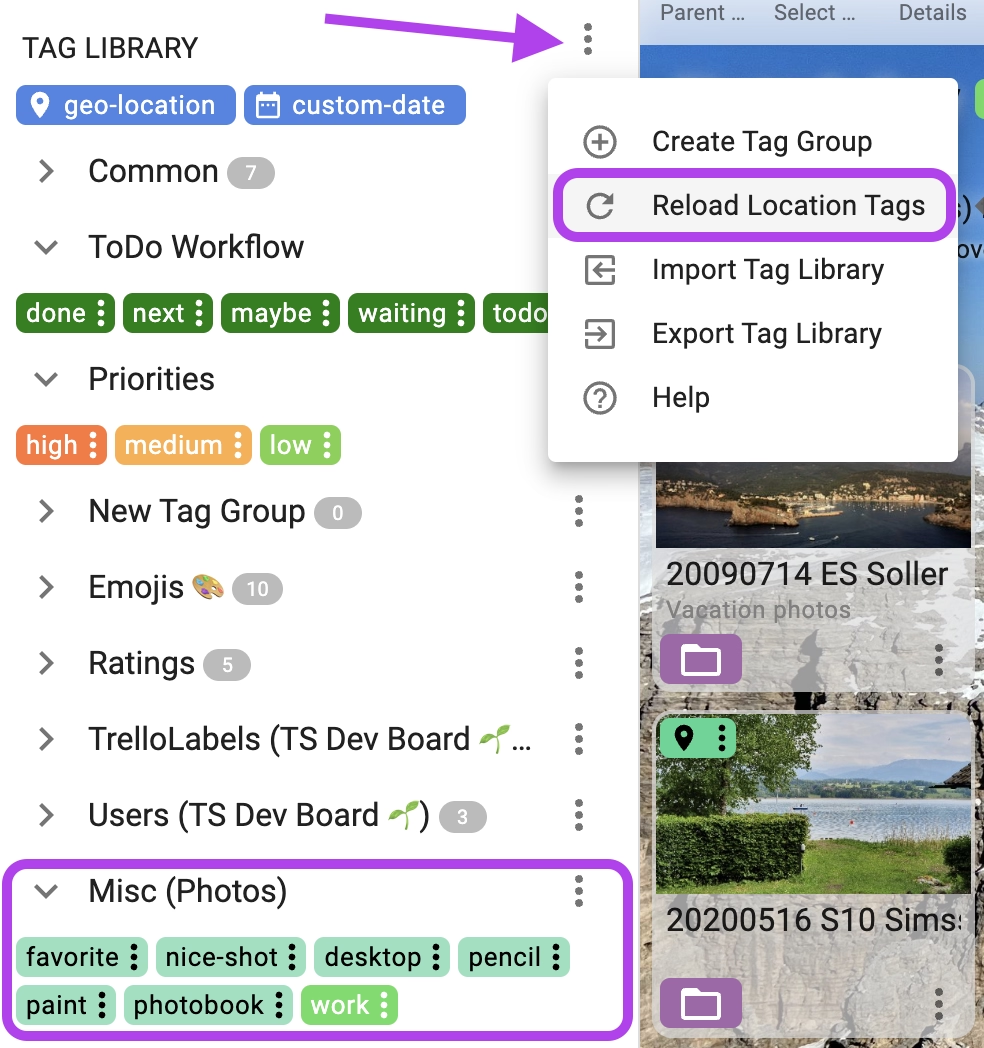
The format of this file is the same as the tag library export format. You can take an exported tag library file, rename it to tsl.json, and place it in the .ts folder of a location's root. After clicking Reload Location Tags in the tag library menu, the tag groups will appear in the Tag Library with the location name in brackets, as shown in the following screenshot.
{
  "appName": "TagSpaces", // the app name from which this file was generated
  "appVersion": "3.11.2", // the version of the app from which this files was generated
  "tagGroups": [
    // a list of one or more tag groups
    {
      "created_date": "1740474629766", // the time when this tag group was created
      "uuid": "2e0c46f0-3a1b-4902-a930-58a0a1a170f8", // a universally unique identifier of the tag group
      "title": "TestTagGroup", // the name of the tag group
      "readOnly": "true", // specifies if the tag group can be edited
      "color": "#fa573cff", // the default color of the tags in this tag group
      "textcolor": "white", // the default text color of the tags in this tag group
      "children": [
        // a list of one or more tags in the current tag group
        {
          "type": "sidecar",
          "title": "tag1", // the name of the tag
          "color": "#fa573cff", // the color of the tag
          "textcolor": "white" // the text color of the tag
        },
        {
          "type": "sidecar",
          "title": "tag2",
          "color": "#fa573cff",
          "textcolor": "white"
        }
      ],
      "modified_date": "1740474629766",
      "expanded": false
    }
  ]
}